
Cart 2 india


In2Cart
Rs. 0

0



Product Information
Specification
Brand : DAGIJIRD
BulletPoint1 : 1. Built-in 55 kinds of programs, 12 test pictures
BulletPoint2 : 2. Support LED and LCD panel
BulletPoint3 : 3. Support to 7-84'' panel, resolution : HD1920 * 1200
BulletPoint4 : 4. Short circuit protection
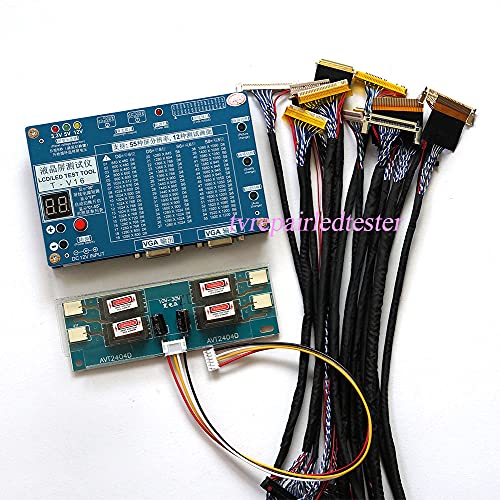
BulletPoint5 : 5. Package includes : 1x panel tester; 1x 1/2/4 lamp backlight inverter driver board; 14x Lvds cables
Color : Blue
ItemName : LCD/LED Test Tool Panel Tester Computer TV Repair Tool Support 7"-84" Built-in 55 Kinds of Programs 12 Test Pics
ItemPackageDimensions_Height : 3 centimeters
ItemPackageDimensions_Length : 3 centimeters
ItemPackageDimensions_Width : 3 centimeters
ItemPackageQuantity : 1
ItemTypeKeyword : voltage-testers
Manufacturer : DAGIJIRD
Material : default
MeasurementType : Voltmeter
ModelName : UNIVERSAL
NumberOfItems : 1
PartNumber : DJA072400000
PowerSourceType : Corded Electric
ProductDescription : Important:
1, Have English manual,so that you can use it properly.
2, Do not try to disassemble or open it . After display show ''88'', itwill be automatically locked, can not be used and we can not change itfor you.
3, Powered by 12V 4A adapter(not included).
Color of the tester: Blue
Updates:
1. Update to 55 programes,12 test pictures
2. Short circuit protection
when screen shows :
"A1"- panel cable short circuit
"A2"- 12v backlight Short circuit
"A3"- 5v backlight Short circuit
3. VGA Input and Output
4. Single Chip Computer, support Panel B+
Features:
1. More convenient, durable, convenient, high efficiency and practical.
2. Support New 5V LED screen backlight , VGA interface
3. Support 55 kinds of programs, 12 tester pictures
4. Support for LCD and LED
5. Support HD 1920 * 1200
6. Support for 7-84 inch
7. Screen tester and inverter tester
8. Short circuit protection
How to set up tester to test LCD Screen:
1, Identify know the part number of the LCD Panel
2, Choose a correct LVDS cable and setting according to the panel
3, Apply setting to Tester (Right resolution and screen voltage)
4, Connect LCD panel LVDS cable between Tester and LCD Panel
5, Connect LCD screen's back light to Tester
6, Apply Input Signal to VGA
7, Connect 12V DC to Tester and Turn it on
Detailed information about the LVDS cables:
1,fix 30pin single 8
2,fix 30pin single 6
3,fix 30pin double 8
4,df 14 single 8
5,df 14 single 6
6,df 14 double 6
7,fix 10.1'' cable
8,led 15.6'' cable
9,fix 20pin single 6
10,fix 20pin single 8
11, 51146 single 6
Totally 11 pcs LVDS cables
Package Contents:
1* panel tester
11* LVDS cable
1* 4 lamps inverter
1* single lamp inverter
ProductSiteLaunchDate : 2023-04-19T21:11:07.244Z
Size : default
UnitCount : 1
