
Cart 2 india


In2Cart
Rs. 0

0



Product Information
Specification
Brand : LILLIPUT
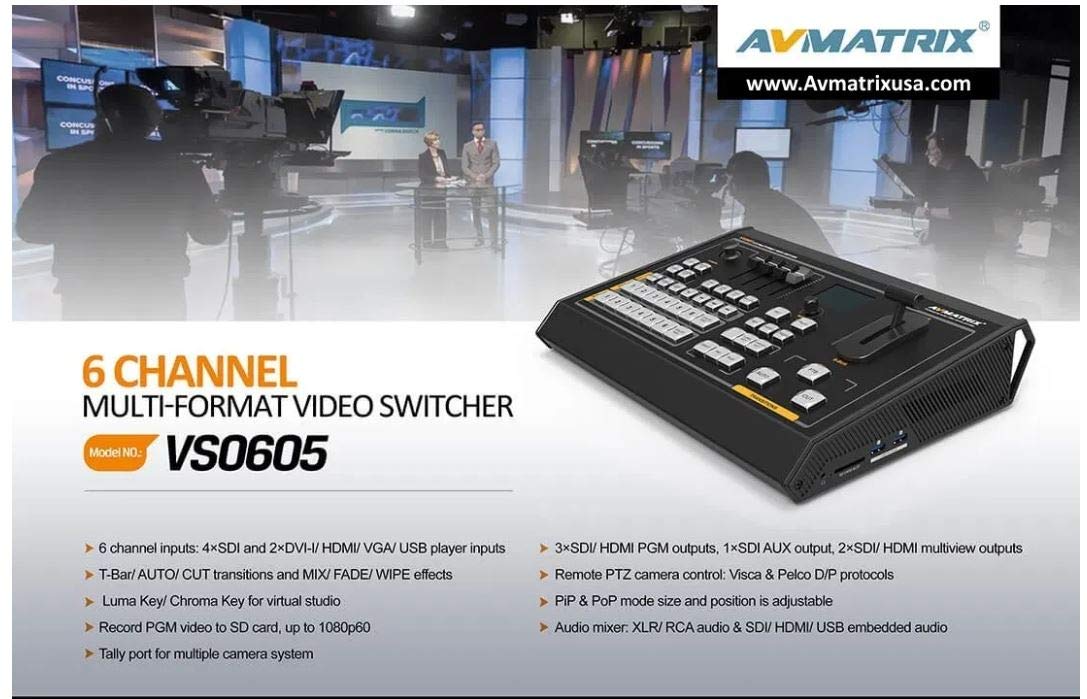
BulletPoint1 : The video switcher is an all-in-one 6-channel video switcher that allows video switching, audio mixing, and video recording.
BulletPoint2 : Camera Control:CAM1 and CAM2 buttons are for Camera 1, Camera 2. ZOOM IN and ZOOM OUT to adjust the size of the picture. Press the button, the button LED will be turned on to indicate that the manual mode is enabled. Then the camera can be controlled via the Joystick.
BulletPoint3 : Audio Mixer: CH1 ON / CH2 ON / CH3 ON buttons are for SDI1 / SDI2 / SDI3 / SDI4/ VIDEO5 / VIDEO6 / XLR / RCA / MIC audio source selection. Master for output the mixing audio to program. The audio faders are for adjusting the audio volume.
BulletPoint4 : Audio Mixer CH1 ON / CH2 ON / CH3 ON buttons are for SDI1 / SDI2 / SDI3 / SDI4/ VIDEO5 / VIDEO6 / XLR / RCA / MIC audio source selection. Master for output the mixing audio to program. The audio faders are for adjusting the audio volume.
BulletPoint5 : Luma Key Luma key consists of one video source containing the video image that will be stacked on top of the background. All the black areas defined by the luminance in the video signal will be made transparent so that the background can be revealed underneath. Therefore, the final composition does not retain any black from the graphic because all the black parts have been cut out of the image.
CircuitType : 1-way
Color : matte, white
CompatibleDevices : Camera
ConnectivityProtocol : Wi-Fi
ConnectorType : VGA
ControlMethod : touch
ControlMethod1 : remote
ControlMethod2 : touch
ExternallyAssignedProductIdentifier : 6971118000197
ExternallyAssignedProductIdentifier1 : 0815996021249
ExternallyAssignedProductIdentifier2 : 815996021249
GpsrSafetyAttestation : 1
IncludedComponents : No
ItemName : AVMATRIX VS0605 6CH SDI/HDMI Multi-format Video Switcher Multiformat input:SD, HD,FHD
ItemPackageDimensions_Height : 40.894 centimeters
ItemPackageDimensions_Length : 12.954 centimeters
ItemPackageDimensions_Width : 38.608 centimeters
ItemPackageQuantity : 1
ItemTypeKeyword : audio-video-selectors
Manufacturer : LILLIPUT
Material : Plastic
ModelNumber : WTY5901WK
MountingType : Wall Mount
NumberOfItems : 1
NumberOfPorts : 5
NumberOfPositions : 4
OperationMode : automatic
PartNumber : VS0605
ProductDescription : AVMATRIX VS0605 6CH SDI/HDMI Multi-Format Video Switcher Multiformat Input:SD, HD,FHD
Main Features
6 channel inputs: 4xSDI and 2xDVI-I/HDMI/VGA/USB player inputs
2xSDI & 1xHDMI PGM outputs, 1xSDI AUX output, 1xSDI & 1xHDMI multiview outputs
Input format auto-detected and PGM/AUX output format selectable
Remote PTZ camera control: Visca & Pelco protocol
T-Bar/ AUTO/ CUT transitions and MIX/ FADE/ WIPE effects
Luma Key/ Chroma Key for virtual studio
PIP/ POP window size and position adjustable
Record PGM video to SD card, up to 1080p60
Audio mixer: TRS audio & SDI, HDMI, USB embedded audio
Tally port for multiple camera system
Chroma Key
In a chroma key two images are combined using a special technique and a color from one image is removed, revealing another image behind it. Chroma key is commonly used for weather broadcasts, where the meteorologist appears to be standing in front of a large map. In the studio the presenter is standing in front of a blue or green background. This technique is also referred to as color keying, color-separation overlay, green screen, or blue screen. PIP and POP PIP, Picture in Picture. The program is display on the full screen, and at same time the preview source will be displayed in the program window as an inset window. The size and location of the inset window can be adjusted from the menu. POP, Picture outside Picture. This is the same function as PIP only this allows you to see the program source and preview source side by side. SHIFT The SHIFT button is an alternate function key. When press the SHIFT button with 5/6 buttons from PVW row, the signal source of the channel 5/6 will be selected from DVI / VGA / USB. USB signal source comes from two USB media players. USB Media Player Control The video switcher has two USB ports for playing the USB media, including video and picture. Press USB5 or USB6 button to select the one which you want to control. The VD/PIC
ProductSiteLaunchDate : 2020-05-22T22:45:18.408Z
SpecificationMet : ETL
StreetDate : 2019-12-13T00:00:01Z
SupplierDeclaredDgHzRegulation : not_applicable
SwitchType : Touch Switch
TerminalType : Screw
UnitCount : 1
UnspscCode : 52161500
