
Cart 2 india


In2Cart
Rs. 0

0


Home / Electronics / Phones


Product Information
Specification
AnsweringSystemType : Digital
Brand : GOTOTOP
BulletPoint1 : [Easily Make International Calls] Achieve long distance or global calls with broadband network, router, or ordinary telephone.
BulletPoint2 : [Enhanced Connectivity] Two ports for voice-over-ip and support for sip v2 protocol for seamless communication.
BulletPoint3 : [Portable Design] Lightweight and compact for easy transport and use in various locations.
BulletPoint4 : [Convenient Setup] Comes with a network cable for easy installation.
BulletPoint5 : [Versatile Usage] Ideal for home or office settings, allowing for cost-effective communication solutions.
Color : Silver
CompatibleDevices : Computer Systems, VoIP Services, Other Communication Devices
ConferenceCallCapability : 3 way
DialerType : Tone Dialing (Dual-tone Multi-frequency)
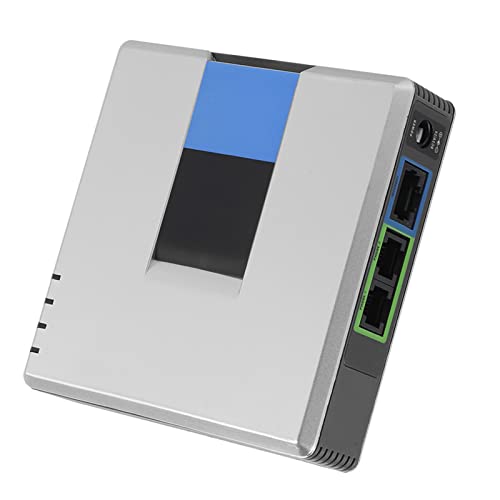
ItemName : Unlocked VoIP Gateway, Internet Phone Adapter with 2 Ports for Voice Over IP Comes with a Network Cable, SIP V2 Protocol Support (US Plug)
ItemPackageDimensions_Height : 23.6 centimeters
ItemPackageDimensions_Length : 5.6 centimeters
ItemPackageDimensions_Width : 15.9 centimeters
ItemPackageQuantity : 1
ItemTypeKeyword : voip-telephones
Manufacturer : GOTOTOP
Material : Metal
MemoryStorageCapacity : 1 GB
ModelNumber : GOTOTOPx9gywg4rvo-01
MultilineOperation : Multi-Line Operation
NumberOfItems : 1
PartNumber : GOTOTOPx9gywg4rvo-01
PowerSourceType : Power over Ethernet
ProductDescription : Specification:
Type: VoIP Gateway
Plug type: US / EU / UK / AU (100-240V)
Brand: For Linksys
Model: PAP2T-NA PAP2T
DHCP: Support
SIP V2 protocol: Support
Support fax and multi-voice compression G.711, G.726, G.729, G.723.1
Easily complete configuration access encryption through a web browser to automate firmware upgrades
Standard: IEEE 802.3, IEEE 802.3u
Port: 1 10/100 M RJ-45 network interface, 2 standard telephone interfaces, 1 power interface
Cable type: RJ45 Category 5 twisted pair; RJ11 standard telephone line
Base indicator: Power, Ethernet, telephone (1-2)
Network Protocol: SIP v2
Security features: Key management
VoIP Setup Manual:
1. Connect the PAP2 device to the router with a network cable. The phone is also connected to the PAP2 device and connected to the power supply.
2. Then, press: 110#, the phone will report the address assigned by the PAP2 device on the router. Of course, the address assigned by each device is different, and pay attention to the phone prompt tone.
For example, the IP address assigned by PAP2 on the router is: 192.168.1.102. Open IE and enter 192.168.1.102 in the address. The following interface will appear.
3. Then, find the administrative entry, admin login. Click the left to find the following interface. Set up the Line 1 phone (line 2 is the second phone, corresponding to phone 1 and phone 2 on the device, the second phone is set up in the same way as the first phone), fill in the , Fill in the server's IP address (this is provided by the VoIP service provider). Fill in your account number and password.
Package List:
1 * VoIP Gateway
1 * Power Adapter
1 * User Manual
1 * Network Cable
ProductSiteLaunchDate : 2024-12-30T17:02:17.456Z
Size : US Plug
SupplierDeclaredDgHzRegulation : not_applicable
TelephoneType : Corded
UnspscCode : 43220000
Voltage : 12 volts
WarrantyDescription : 90 days limited warranty
