
Cart 2 india


In2Cart
Rs. 0

0



Product Information
Specification
Brand : Givwizd
BulletPoint1 : [Backlight: No] [Plamrest: Without]
BulletPoint2 : 1.This keyboard is difficlult be replaced, please read the description before purchase.
BulletPoint3 : 2.To replace the keyboard, you need to open the bottom case and remove the motherboard firstly.
BulletPoint4 : 3.Then you will see the old keyboard is fixed by many plastic rivets, you need to use a knife or soldering iron to remove all the rivets.
BulletPoint5 : 4. When you put the new keyboard into the plamrest, you need to use a hot glue gun to fasten the keyboard back.
ButtonQuantity : 19
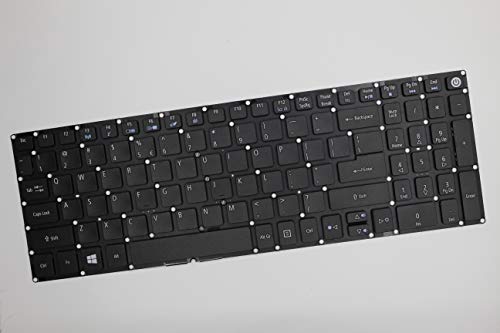
Color : As shown
CompatibleDevices : Laptop
ConnectivityTechnology : Powerline
ExternallyAssignedProductIdentifier : 8414824890341
ExternallyAssignedProductIdentifier1 : 712492001419
ExternallyAssignedProductIdentifier2 : 0712492001419
GpsrSafetyAttestation : 1
HandOrientation : Ambidextrous
HardwareInterface : solid_state_drive
HardwarePlatform : Laptop
InstallationType : Internal Hard Drive
ItemName : Givwizd Replacement Keyboard for Acer Aspire E5-573 E5-573G E5-573T E5-573TG E5-574 E5-574G E5-574T E5-574TG E5-575 E5-575G E5-575T E5-575TG E5-576 E5-576G, Without Backlit and Palmrest
ItemPackageDimensions_Height : 20.1 centimeters
ItemPackageDimensions_Length : 2.5 centimeters
ItemPackageDimensions_Width : 10.2 centimeters
ItemPackageQuantity : 1
ItemTypeKeyword : laptop-computer-replacement-parts
KeyboardDescription : Membrane
KeyboardLayout : qwerty
Manufacturer : Givwizd
Material : SATA
Material1 : Plastic
Material2 : Metal
ModelNumber : 8541584728
NumberOfItems : 1
NumberOfKeys : 80
PartNumber : 7545721694
PowerSourceType : Wired
ProductDescription : Please note, this keyboard is difficlult be replaced.
It is only compatible with the models we advertised in the title, please confirm your laptop model before purchase.
You can contact us for the video tutorial if this is your first time to replace the riveted keyboard.
1. To replace the keyboard, you need to open the bottom case and remove the motherboard firstly.
2. Then you will see the keyboard was covered by a metal sheet.
3. The metal sheet was fixed by many plastic rivets, you need to use a knife or soldering iron to remove all the rivets.
4. Then you can take the old keyboard out from the palmrest.
5. When you put the new keyboard into the plamrest, you need to use a hot glue gun to fasten the keyboard back.
If you are planning to replace the key cap seperately, please sent us the photo of your old key cap before purchase, then we can check if our key cap is the same as yous or not.
ProductSiteLaunchDate : 2019-11-16T10:01:46.886Z
SpecificUsesForProduct : Personal
Style : Modern
SupplierDeclaredDgHzRegulation : unknown
UnitCount : 1
UnspscCode : 43210000
WarrantyDescription : 1 Year Manufacturer
