
Cart 2 india


In2Cart
Rs. 0

0


Product Information
Specification
Brand : IOGEAR
BulletPoint : CS19208
BulletPoint1 : Thickened PCB Board: USB 2.0 printer switcher adopts thickened PCB board, sturdy soldering and stable . Compact and portable, easy to use.
BulletPoint10 : Dual display port kvm switch,kvm switch dual monitor display port,kvm switch 2 monitors 2 computers displayport,Dual Monitor KVM switch Display Port 1.4: If your computer has a USB Type-C output and you need a Type-C KVM switcher, you can use a Type-C to DP cable, connect it to the DisplayPort KVM switches, and then use a DP cable to connect to the monitor. This setup will ensure the Type-C output works properly. Please note that there is no Type-C to DP cable included in the KVM box. If you need a Type-C to DP cable, you can purchase it by DaoFaZiRan Typec -c to dp cable.
BulletPoint2 : Case: USB printer switch case is made of unique polymer material, high temperature resistant, and sturdy, longer service life.
BulletPoint3 : Plug and Play: Bidirectional USB switch does not require external power supply, USB cable direct power supply, plug and play, no drivers need to be installed
BulletPoint4 : One Switch: The USB 2.0 switch is designed to switch between two computers with one , making your work more efficient and your desktop tidier.
BulletPoint5 : Bidirectional Switch: This compact USB 2.0 switcher allows you to share a USB device such as printer, scanner, mouse, keyboard, card reader, flash drive and other USB deivce between 2 computers.
BulletPoint6 : Note - Must use the included DC Adapter to operate the KVM. PD 100W charging adapter and cable not included and must be used to enable charging on USB-C Host [PC 2]. Battery not included for IR Remote.
BulletPoint7 : Displayport kvm Switch Dual Monitor 1440P,dual display port kvm switch 240hz,Display Port KVM switch 2 Monitors 2 Computers 4K 144Hz: This DP KVM switch supports hotkey switching, allowing you to switch between 2 computers. Use the hotkey sequence Right Ctrl + Right Ctrl + 1 + Enter to switch to PC-A, and Right Ctrl + Right Ctrl + 2 + Enter for PC-B. To turn the beep on or off, use Right Ctrl + Right Ctrl + B + Enter on your keyboard.4k kvm switch,displayport kvm
BulletPoint8 : Display port kvm switch 2 monitors 2 computers,dual monitor kvm switch displayport : If your computer has a Thunderbolt output and you want a Thunderbolt KVM switch, you can connect it using a Type-C to DP cable, then the DisplayPort KVM switch, and finally a DP 2.0 cable to the monitor. This setup will support the Thunderbolt input.kvm switch displayport,thunderbolt kvm switch ,thunderbolt switch,thunderbolt kvm
BulletPoint9 : Display port kvm switch dual monitor,kvm switch 2 monitors 2 computers display port,dp kvm switch dual moniotr: If your computer has an HDMI output and you need a DisplayPort KVM switch, you can use an HDMI to DP adapter cable, then connect it to the DisplayPort KVM switch, followed by a DP 2.0 cable to the monitor. This setup will ensure the HDMI output works properly. monitor 1440p 144hz,display port kvm switch,kvm swtich hotkey .
CircuitType : 8-way
Color : Black
CompatibleDevices : CL5808, CL5816, CS82U, CS84U
ConnectivityProtocol : Hdmi
ConnectorGender : Male-to-Male
ConnectorType : Usb
ControllerType : USB, DisplayPort, HDMI
ControlMethod : touch
CurrentRating : 0.5 amps
ExternallyAssignedProductIdentifier : 4712896223758
ExternallyAssignedProductIdentifier1 : 0881317520845
ExternallyAssignedProductIdentifier10 : 0132017755359
ExternallyAssignedProductIdentifier11 : 0672792002694
ExternallyAssignedProductIdentifier12 : 0115971621151
ExternallyAssignedProductIdentifier13 : 0132017805634
ExternallyAssignedProductIdentifier14 : 0172304347959
ExternallyAssignedProductIdentifier15 : 5054629338902
ExternallyAssignedProductIdentifier16 : 00672792002694
ExternallyAssignedProductIdentifier2 : 881317520845
ExternallyAssignedProductIdentifier3 : 132018345375
ExternallyAssignedProductIdentifier4 : 172304347959
ExternallyAssignedProductIdentifier5 : 672792002694
ExternallyAssignedProductIdentifier6 : 132017755359
ExternallyAssignedProductIdentifier7 : 5054533473461
ExternallyAssignedProductIdentifier8 : 0132018345375
ExternallyAssignedProductIdentifier9 : 5054484473466
IncludedComponents : 1X USB-C cable, 1X USB-A to USB-B cable, 1X HDMI cable, 1X DC Adapter
InternationalProtectionRating : IP00
ItemDisplayDimensions_Height : 2 inches
ItemDisplayDimensions_Length : 8 inches
ItemDisplayDimensions_Width : 7 inches
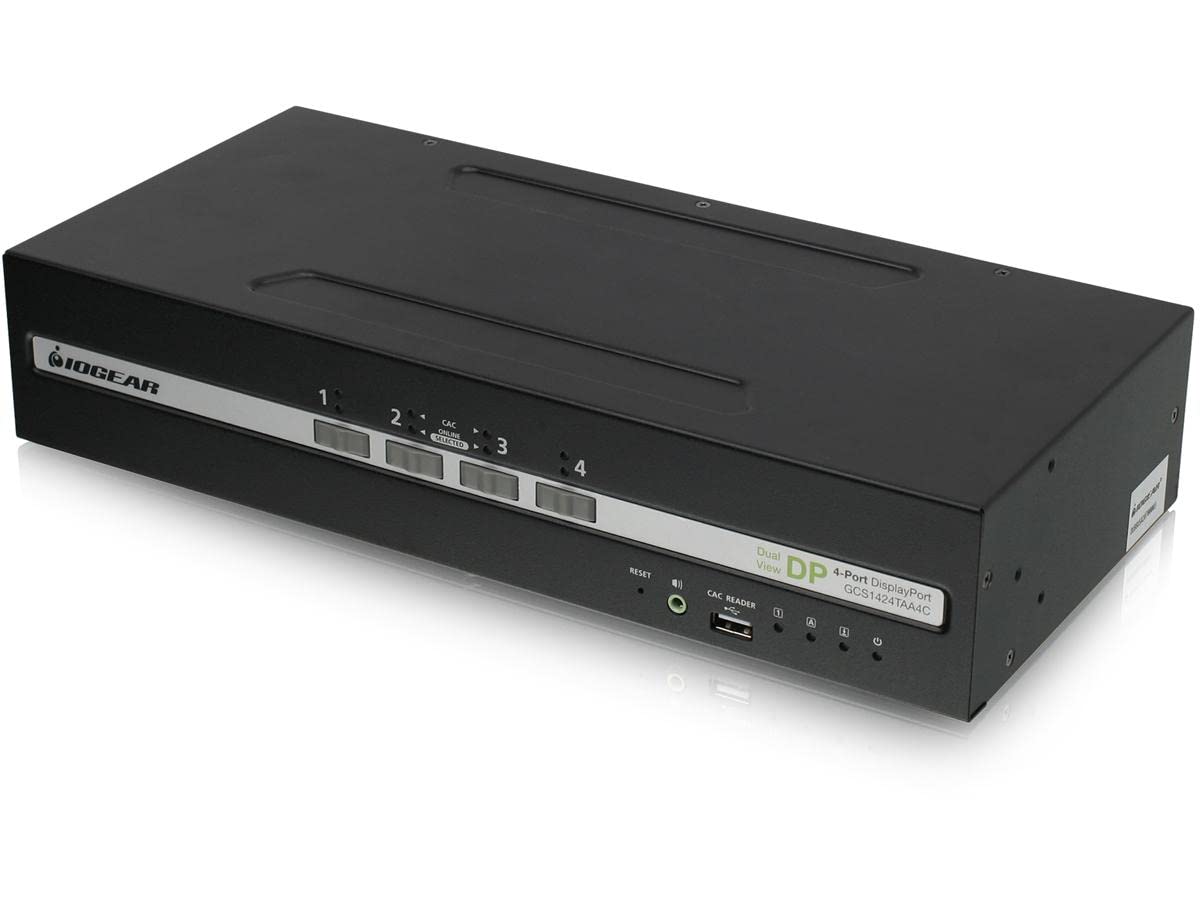
ItemName : 4-Port Dual View Displayport Secure Kvm Switch W/Audio And Cac Support
ItemPackageDimensions_Height : 8 inches
ItemPackageDimensions_Length : 22 inches
ItemPackageDimensions_Width : 16 inches
ItemPackageQuantity : 1
ItemShape : Round
ItemTypeKeyword : computer-data-switches
LightType : LED
LowerTemperatureRating : 50 degrees_celsius
Manufacturer : IOGEAR
Material : Metal
ModelName : Genericn8zqaw249o
ModelNumber : GCS1424TAA4C
MountingType : Rack Mount
NumberOfItems : 8
NumberOfPositions : 8
OperatingVoltage : 5 volts
OperationMode : automatic
PartNumber : GCS1424TAA4C
ProductDescription : 4-Port Dual View DisplayPort Secure KVM with Audio and CAC Protection Profile v4.0C Secure and manage multiple data-sensitive systems from one workstation from internal and external cybersecurity threats with the TAA-compliant IOGEAR 4-Port Dual View DisplayPort Secure KVM with Audio and CAC Protection Profile v4.0. Enable authorized users secure access to up to four systems with one keyboard, mouse, up to two 4K @30Hz monitors and dedicated common access card (CAC) reader port. Featuring the latest in Common Criteria and NIAP Protection Profile v4.0 security requirements set for the U.S. government for peripheral sharing switches, the secure KVM switches are built for multiple interfaces and ideal for use in high-security environments that demand rigorous cybersecurity provisions including military and defense, federal agencies, government, utilities, commercial and healthcare applications.< / p> NIAP Certified, Common Criteria Compliance & TAA CompliantC< / p> IOGEAR secure KVM switches comply with NIAP PP v4.0 security certification meeting the latest cybersecurity requirements from the U.S. government. The secure KVM also meets with the Common Criterial Compliance as part of the international Common Criteria Recognition Arrangement. The unit also meets with all TAA-compliant guidelines. Active Tamper-Proof SystemC IOGEAR secure KVM switch hardware security is comprised of tamper-evident seals, active chassis intrusion detection, and tamper-proof hardware. Compliance with NIAP Protection Profile v4.0 certifies that non-approved USB peripherals will be rejected and cannot be connected to the secure KVM switch, providing high-level security, protection and data safekeeping. With the combination of physical and software security, secure KVM switches offer secure air-gap network isolation to prevent internal and external access to individual system with authorization while consolidating multiple
ProductSiteLaunchDate : 2022-07-16T17:40:39.250Z
SpecificationMet : CE
Style : kvm Switch display port 2 monitors
SupplierDeclaredDgHzRegulation : not_applicable
SupplierDeclaredHasProductIdentifierExemption : 1
SwitchType : Solid-state
TerminalType : Through Hole
UnitCount : 1
UnspscCode : 43220000
UpperTemperatureRating : 40 degrees_celsius
