
Cart 2 india


In2Cart
Rs. 0

0



Product Information
Specification
Brand : Corsair
BulletPoint : With no moving parts, Intel SSDs offer a quiet storage solution that responds quickly and uses less power
BulletPoint1 : PCIe 5.0 Performance Powered by NVMe 2.0: PCIe 5.0 x4 combines with the massively high-bandwidth NVMe 2.0 interface to unleash higher-speed data transfers and greater M.2 SSD performance than ever before.*SSD cooling required.
BulletPoint2 : Your PC Made Faster: Load games, boot Windows, and manage large files with unprecedented speed, reaching up to 14,000MB/sec sequential read and 12,000MB/sec sequential write speeds.**Performance and endurance vary by capacity.
BulletPoint3 : Wide Compatibility: Supports the latest PCIe 5.0 architecture of Intel Z790 and AMD X670 platforms and beyond.
BulletPoint4 : High-Density 3D TLC NAND: Provides the ideal mix of performance and endurance to keep your drive performing at its best for years.
BulletPoint5 : Microsoft DirectStorage***: Enables the MP700 PRO SE to communicate directly with your graphics card when playing compatible games, for unbelievably fast load times. ***DirectStorage requires a DirectX12 GPU with Shader Model 6.0 support.
BulletPoint6 : 【Wide Range of Uses】Compatible with a variety of scenarios, 1TB m.2 ssd can meet the needs of different users. Suitable for PC/desktop storage expansion, data storage, and SSD Upgrade. Yottamaster M.2 SSD provide 5-year limited assurance service and 300TBW durability rating.
Capacity : 960 GB
Color : Black
CompatibleDevices : Desktop
CompatibleDevices1 : ノートパソコン
CompatibleDevices2 : デスクトップパソコン
ConnectivityTechnology : USB
ConnectorType : M.2 NVMe to 12+16 Pin
CustomerPackageType : Bare Drive
DataTransferRate : 14000 megabytes_per_second
DigitalStorageCapacity : 4 TB
ExternallyAssignedProductIdentifier : 4713436151319
ExternallyAssignedProductIdentifier1 : 840006686774
ExternallyAssignedProductIdentifier2 : 0840006686774
ExternallyAssignedProductIdentifier3 : 00840006686774
ExternallyAssignedProductIdentifier4 : 0740617291452
ExternallyAssignedProductIdentifier5 : 00740617291452
FinishType : Nvme
FormFactor : M 2
GpsrSafetyAttestation : 1
HardDiskFormFactor : 2.5 inches
HardwareInterface : solid_state_drive
HardwareInterface1 : sata_6_0_gb
HardwareInterface2 : sata_6_0_gb
HardwarePlatform : windows, os
IncludedComponents : CORSAIR MP700 PRO SE 4TB M.2 PCIe Gen5 x4 NVMe 2.0 SSD (No included heatsink)
IncludedComponents1 : ipod SSD
IncludedComponents2 : Cable
InstallationType : Internal Hard Drive
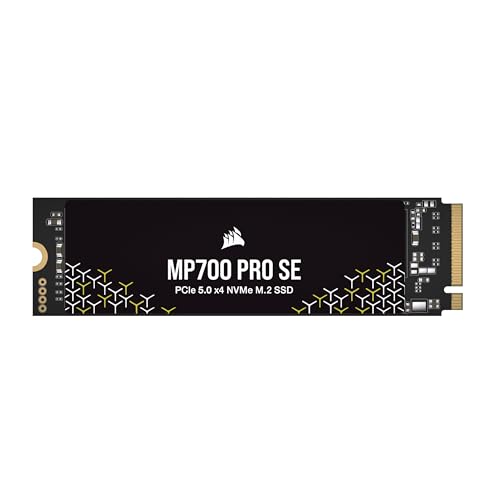
ItemName : Corsair MP700 PRO SE 4TB M.2 PCIe Gen5 x4 NVMe 2.0 SSD – M.2 2280 – Up to 14,000MB/sec Sequential Read – High-Density TLC NAND – Black
ItemPackageDimensions_Height : 12.6 centimeters
ItemPackageDimensions_Length : 1.3 centimeters
ItemPackageDimensions_Width : 7.6 centimeters
ItemPackageQuantity : 1
ItemTypeKeyword : computer-internal-solid-state-drives
Manufacturer : Corsair
Material : Silicone
MemoryStorageCapacity : 480 GB
ModelName : MP700 PRO SE
ModelNumber : CSSD-F4000GBMP700PNHS
NumberOfBoxes : 1
NumberOfItems : 1
NumberOfPorts : 1
PackageLevel : unit
PartNumber : CSSD-F4000GBMP700PNHS
Platform : not_machine_specific
PowerPlugType : no_plug
ProductDescription : RIITOP NVMe to 12+16 Pin SSD adapter is compatible with the following MacBook Models (Note: requires macOS 10.13.6 High Sierra or later) How to use: 1. Make sure to install the High Sierra on your original drive, so that a newer firmware is installed that can drive NVMe. 2. For your old driver, please do a full backup via Time Machine. 3. Create a High Sierra Installer on a bootable USB stick. 4. Open the Macbook and disconnect the battery while switching out the drive and make sure both adapter and new SSD sit snug. 5. Reconnect the battery before closing the shell. 6. Insert the Installer USB stick from step 2, and press the option key while the machine starts. 7. Finally, once it's up you can now go to the disk utils to format and install the MAC OS. Notice: 1. mac OS failed on resume from hibernating with some NVME SSDs. Please turn off laptop all the time instead of close the lid and go. 2. Please insert our adapter fully into SSD slot, A bootable USB disk(see third point) must be prepared with High Sierra to format M.2 SSD first, it can't support recover from internet. 3. There are many customers can use it, so we suggest you to try it again if your MAC can't detect nVME SSD.
ProductSiteLaunchDate : 2024-05-01T21:29:15.199Z
ReadSpeed : 14000 megabytes_per_second
Size : 4TB
SpecificUsesForProduct : Gaming
StreetDate : 2024-05-09T00:00:01Z
Style : SSD
SupplierDeclaredDgHzRegulation : not_applicable
SupplierDeclaredHasProductIdentifierExemption : 1
UnitCount : 1
UnspscCode : 43201830
WarrantyDescription : 5 Year Manufacturer
Wattage : 7.5 watts
WriteSpeed : 500-560 MB/s
WriteSpeed1 : 12000
WriteSpeed2 : 12000
