
Cart 2 india


In2Cart
Rs. 0

0



Product Information
Specification
BatteriesIncluded : 1
BatteriesRequired : 1
Brand : UrbanX
BulletPoint : Marvo M359 800-3200 DPI Wired Gaming Mouse with RGB Lighting, Black
BulletPoint1 : Experience seamless connectivity with the best compatible Bluetooth 5.1 chip that works with over 99% of Bluetooth devices, including your Pad, Phone, PC, Mac, and Android tablet. Compatible with more than 99% Bluetooth devices. Connect Pad 10.2 2019, Pad 9.7 Inch 2018, Pad 9.7 2017, Pad Pro 12.9" / 11.0" / 10.5"/ 9.7", Pad Air 10.5 / Air 2, Pad mini 5/ 4, Phone 11 Pro and pro Max, Phone 12 Pro and pro Max, Phone 13 Pro and pro Max, Phone Xs Max etc.
BulletPoint2 : Say goodbye to battery changes with our rechargeable optical wireless mouse, which lasts up to 500 hours after a single charge and features an auto sleep and wake mode for extended standby time.
BulletPoint3 : Enjoy maximum comfort while you work, thanks to our skin-friendly mouse with a classic design and anti-fingerprint finish. The sturdy, anti-slip rubber scroll wheel ensures that your hand will not slip while scrolling. Stay focused and productive without worrying about disturbing others with our noise-free mouse. Its silent click sound makes it perfect for home use while family members are resting.
BulletPoint4 : We stand behind the quality of our products and offer a 365-day warranty for our Bluetooth mouse from UrbanX. Order now and experience the best wireless mouse for all your devices.
BulletPoint5 : Note: Updated System to PadOS 13 and iOS 13 or above, and Turn on the Assistive Touch feature.
ButtonQuantity : 4
Color : Onyx Black
CompatibleDevices : Personal Computer
CompatibleDevices1 : Dell G5 5500 Laptop
CompatibleDevices2 : Laptop
CompatibleDevices3 : iPad
CompatibleDevices4 : Tablet
CompatibleDevices5 : Mac
ConnectivityTechnology : Bluetooth
ExternallyAssignedProductIdentifier : 6932391923337
ExternallyAssignedProductIdentifier1 : 726358438707
ExternallyAssignedProductIdentifier10 : 0726358445774
ExternallyAssignedProductIdentifier11 : 0726358435515
ExternallyAssignedProductIdentifier12 : 0726358437588
ExternallyAssignedProductIdentifier13 : 0726358448744
ExternallyAssignedProductIdentifier14 : 0726358437045
ExternallyAssignedProductIdentifier15 : 0726358438486
ExternallyAssignedProductIdentifier16 : 0726358447938
ExternallyAssignedProductIdentifier2 : 726358436901
ExternallyAssignedProductIdentifier3 : 726358449956
ExternallyAssignedProductIdentifier4 : 0726358436901
ExternallyAssignedProductIdentifier5 : 0726358449956
ExternallyAssignedProductIdentifier6 : 0726358438707
ExternallyAssignedProductIdentifier7 : 726358447938
ExternallyAssignedProductIdentifier8 : 726358435515
ExternallyAssignedProductIdentifier9 : 0726358436680
HandOrientation : Right
HardwarePlatform1 : Laptop
HardwarePlatform2 : Smartphone
HardwarePlatform3 : Tablet
HardwarePlatform4 : Mac
Hazmat1 : LITHIUM ION BATTERIES CONTAINED IN EQUIPMENT
Hazmat10 : CN_SmallLithiumIonBatteryInEquipment
Hazmat11 : DE_SmallLithiumIonBatteryInEquipment
Hazmat12 : EG_SmallLithiumIonBatteryInEquipment
Hazmat13 : ES_SmallLithiumIonBatteryInEquipment
Hazmat14 : FR_SmallLithiumIonBatteryInEquipment
Hazmat15 : GB_SmallLithiumIonBatteryInEquipment
Hazmat16 : IN_SmallLithiumIonBatteryInEquipment
Hazmat17 : IT_SmallLithiumIonBatteryInEquipment
Hazmat18 : JP_SmallLithiumIonBatteryInEquipment
Hazmat19 : MX_SmallLithiumIonBatteryInEquipment
Hazmat2 : UN3481
Hazmat20 : NL_SmallLithiumIonBatteryInEquipment
Hazmat21 : PL_SmallLithiumIonBatteryInEquipment
Hazmat22 : SA_SmallLithiumIonBatteryInEquipment
Hazmat23 : SE_SmallLithiumIonBatteryInEquipment
Hazmat24 : SG_SmallLithiumIonBatteryInEquipment
Hazmat25 : TR_SmallLithiumIonBatteryInEquipment
Hazmat26 : US_SmallLithiumIonBatteryInEquipment
Hazmat3 : II
Hazmat4 : 9
Hazmat5 : AE_SmallLithiumIonBatteryInEquipment
Hazmat6 : AU_SmallLithiumIonBatteryInEquipment
Hazmat7 : BE_SmallLithiumIonBatteryInEquipment
Hazmat8 : BR_SmallLithiumIonBatteryInEquipment
Hazmat9 : CA_SmallLithiumIonBatteryInEquipment
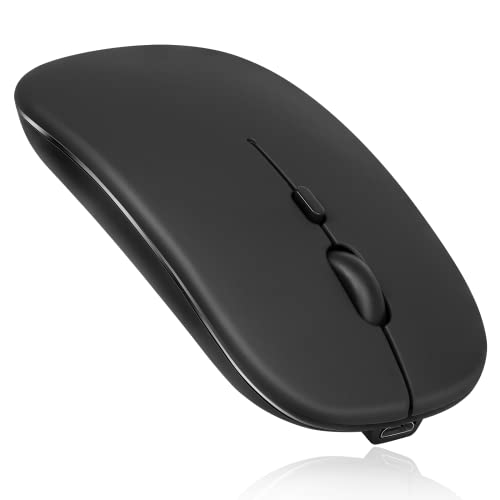
ItemName : UrbanX Bluetooth Rechargeable Mouse for Dell G5 5500 Laptop Bluetooth Wireless Mouse Designed for Laptop/PC/Mac/iPad pro/Computer/Tablet/Android Onyx Black
ItemPackageDimensions_Height : 4 inches
ItemPackageDimensions_Length : 2 inches
ItemPackageDimensions_Width : 3 inches
ItemPackageQuantity : 1
ItemTypeKeyword : computer-game-mice
Manufacturer : URBANX
Material : Rubber
ModelName : Rechargeable Bluetooth Mouse
ModelNumber : UXM030
MouseMaximumSensitivity : 6200 dots_per_inch
MovementDetectionTechnology : Optical
NumberOfItems : 1
NumberOfLithiumIonCells : 1
OperatingSystem : Windows, macOS
OperatingSystem1 : Linux
OperatingSystem2 : Windows Vista
OperatingSystem3 : Windows 7
OperatingSystem4 : Windows XP
PackageLevel : unit
PartNumber : UXM030
PowerSourceType : Battery Powered
ProductDescription : support system: Designed for Windows Vista, Windows XP, Windows 7 / 8 / 10, Linux, Android, Mac OS X (compatible with IMAC one machine / MacBook / MacBook Air / Mac Mini, not compatible macbook pro / ipad / iphone) * Bluetooth version: Bluetooth 5.0 * Photoelectric resolution: 3 adjustable DPI level (1000 / 1200 / 1600DPI) * Built in rechargeable battery: 1000mAh (lithium polymer battery, long cycle life) * Tracking system: optics * Number of keys: 4 (key) * Operating distance: 15 m * Size: 4.4 x 2.3 x 0.8 inches * Weight: 3.18 oz How to use the Bluetooth mouse: 1. Charge for 2 hours before first use, the blue light will be turned on when charging, the blue light is automatically turns off when fully charged. 2. When pairing turn on the Bluetooth mouse (switch to "on" position), press the black circle "Bluetooth connection button" More than 3 seconds. 3. Turn on the computer Bluetooth or pint the cursor toward the Bluetooth signal in the bottom right corner of the computer screen. Right click to select "add device", then the Bluetooth will enter the search state. (Note: Bluetooth normally has a Bluetooth logo in the lower right corner of the computer, if it normally starts.) 4. Wait for the computer to search interface into the Bluetooth device, the Bluetooth computer can search a mouse shape icon or "Bluetooth Mouse", that is the Bluetooth mouse, and then click next to start the match, the pairing is successful mouse begin work. Note: * If your device does not have Bluetooth, you need to install the Bluetooth adapter first. * If you do not use the mouse for a long time, turn off the "ON / OFF" switch. * It rarely occurs that the mouse has a connection problem, if the connection is not on try to delete of the current Bluetooth driver, and download and install the updated correct Bluetooth driver for your computer
ProductSiteLaunchDate : 2022-04-18T10:11:52.491Z
Range : 10.0 meters
RecommendedUsesForProduct : Laptop,Tablet
SpecificUsesForProduct1 : Personal
SpecificUsesForProduct2 : Gaming
SpecificUsesForProduct3 : Business
StreetDate : 2019-06-01T00:00:01Z
Style : Modern
SupplierDeclaredDgHzRegulation : not_applicable
Theme : Video Game
UnspscCode : 43211708
WarrantyDescription : 90 Days money back warrany.
