
Cart 2 india


In2Cart
Rs. 0

0




Product Information
Specification
Brand : Alarm Lock
BulletPoint1 : Deep flash cable - Designed for phones to put them into Deep Flash Mode, also named for 9008 Mode.
BulletPoint2 : Advanced 9008 mode, deep brush by bypassing the BL lock to solve all kinds of problems, such as swiping, unlocking, unlocking account lock.
BulletPoint3 : How to keep the data unlocked - The phone needs to enter the REC mode to unlock the data. If the phone cannot enter the REC mode, there is no use using the engineering line.
BulletPoint4 : For system software failure, as as the phone can enter the 9008 mode through the engineering line, it can be repaired, otherwise it is recommended to change the font library!
BulletPoint5 : For phones with BL lock are fully supported by for CPU processors.
Color : #844
CompatibleDevices : PC
ConnectorGender : Male-to-Female
ConnectorType : USB Type C
ExternallyAssignedProductIdentifier1 : 0371104943273
ExternallyAssignedProductIdentifier2 : 371104943273
IndoorOutdoorUsage1 : outdoor
IndoorOutdoorUsage2 : indoor
InstallationType : Click
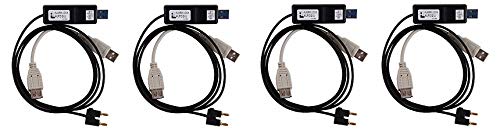
ItemName : Alarm Lock Systems Inc. AL-PCI2-U Computer Interface Cable W/USB (4)
ItemPackageDimensions_Height : 2 centimeters
ItemPackageDimensions_Length : 15 centimeters
ItemPackageDimensions_Width : 6 centimeters
ItemPackageQuantity : 4
ItemShape : Round
ItemTypeKeyword : computer-security-cables
Manufacturer : PUSOKEI
Material : Other
ModelName : BONKZEBU8k2sdy40g6
ModelNumber : PUSOKEIb86rh73f9w
NumberOfItems : 1
PartNumber : AL-PCI2-U
ProductDescription : Specifications:
Type: Brush Line
Model: W230
Material: TPE
Length: Approx. 0.9m / 1yd
Color: White
Weight: Approx. 37g
Compatible Model: All for phones with BL lock and for CPU, for 4S/4C/4i/5, etc
Package list:
1 * Brush Line
Using Method:
1. The first method:
Turned off the phone, insert the line, at the same time hold down the engineering line switch the power button of the mobile phones and lasts for 5 seconds, the computer will make a sound like ding dong, that means the device manager has found the Port 9008. The appearance of 9008 port indicates that you have successfully entered the deep brush mode, and then you can solve all kinds of problems by using the brush tool once for all!
2. The second method:
Turned off the phone, press the volume reduction plus and the power button to enter fastboot mode at the same time, and then press the power button to turn it off. When the mobile phone screen turns black, press the flash button for five seconds, then loosen your hand, by this time, the device manager inside can recognize to port 9008. The appearance of 9008 port says that it has successfully enter into the depth of the flash mode, and then use the for the flash tool flash point, choose wanted material, then flash again. To solve all kinds of problems one time ! The phone is in black all the time, which is a normal , don't worry.
ProductSiteLaunchDate : 2020-01-13T19:02:10.658Z
Size : Pocket Size
Style : Manual
SupplierDeclaredDgHzRegulation : not_applicable
SupplierDeclaredHasProductIdentifierExemption : 1
UnitCount : 1
UnspscCode : 43202222
WarrantyDescription : 30 DAYS
