
Cart 2 india


In2Cart
Rs. 0

0



Product Information
Specification
Brand : colorparts2016
BulletPoint1 : 100% Brand New and High Quality
BulletPoint2 : Perfectly connect your electronics to your car Audio system.
BulletPoint3 : Can charging for Android system phone.
Color : Black
CompatibleDevices : CD host
ConnectorGender : Male-to-Female
ConnectorType1 : RCA
ConnectorType2 : Auxiliary
ExternallyAssignedProductIdentifier1 : 700410047694
ExternallyAssignedProductIdentifier2 : 0700410047694
FinishType : Rca
IndoorOutdoorUsage1 : outdoor
IndoorOutdoorUsage2 : indoor
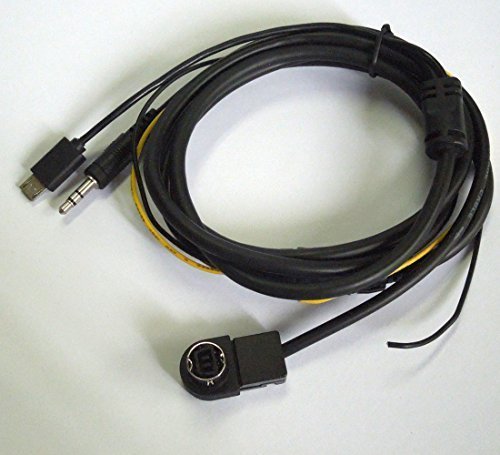
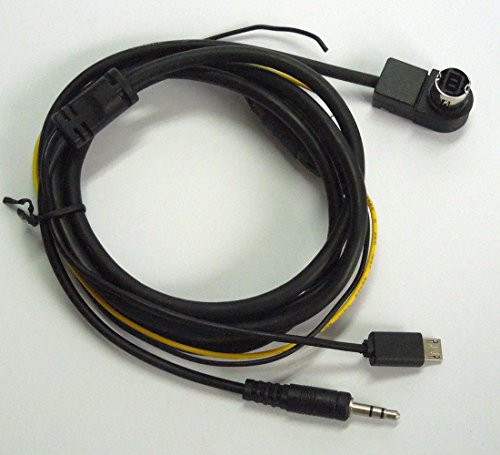
ItemName : Car Android System Charger AUX Ai-net Interface Audio Cable Compatible with Alpine Kca-121b
ItemPackageQuantity : 1
ItemShape : Round
ItemTypeKeyword : vehicle-audio-auxiliary-adapters
Manufacturer : colorparts2016
ProductDescription :
Condition: 100%Brand New
Cable length approx 150cm (4.96ft)
Specifications:
1 x Alpine KCA-121B Connector
1 x 3.5mm jack
1 x Lightning connector
2x charging cable +12 V (yellow) and ground (black) to supply the Android with charging voltage.)
KCA-121B interface cable dedicated Ai-NET/RCA opening method: Such as the 2004 and 2003 parts factory after having AI-Net interface Alpine hosts can install the CDA-7894, CDA-7893, CDA-9805, CDA-9807, CDA-9811, CDA-9812, CDA-9813, CDA- 9815, CDA-9827, CDA-9830, CDA-9831, CDA-9833, CDA-9835, CDA-9856,CDA-9886,CDA-9885,CDA-7998, CVA-1004, IVA-D300, IVA-D900, INA-N333 CDA-9805, CDA-9807 and other host
Setting method: AUX mode setting (V-Link) 1. Press and hold the "Power POWER / INITILIZE" button for 3 seconds or more, 2. Press the DN or UP select "AUX". 3. Press the PLAY / PAUSE button can "AUX IN ON" and "AUX IN OFF" modes. 4. so that you can put disc box interfaces used as AUX input, but also with a dedicated cable connection KCA-121B, KCA-420I to connect!
CDA-7894, CDA-7893, CDA-9811, CDA-9813, CDA-9815, CDA-9827, etc.
Host setting method: AUX mode setting (V-Link) 1. Press and hold F / SETUP button for at least 3 seconds. 2. Press the DN or UP select "AUX". 3. Press BAND in "AUX IN ON" and "AUX IN OFF" modes. NOTE: The original factory setting for the AUX IN OFF. . In AUX IN ON is set, you can press the DN or UP button to set the AUX mode display, select the AUX mode display setting, and then press the TUNE button. . Versatile Link connection when connecting seat (KCA-410C), you can set two AUX mode display. 4. Press the SETUP button to return to normal mode. 5. To adjust the volume function, first press the SOURCE button and select the AUX mode, then make the necessary adjustments.
If you are not sure of your car model or technical issues, you can feel free to contact us.
Package included: 1 x Android charging aux Cable Compatible with Alpine KCA-121B
ProductSiteLaunchDate : 2015-10-06T07:00:00.000Z
UnspscCode : 43202222
